Your server. Your style.
Make it your world.
Create a background for your TunnelCraft server entry. Start with a block-inspired template or bring your own image, then download your ready-to-use banner.png.
Design your background
Preview
Live design preview based on the in-game layout. TunnelCraft centers and darkens the background; the exact appearance depends on your game settings.
Your exported background1024 × 128
The PNG contains the background only. Server text, icon and dimming are added by TunnelCraft.
Preparing your PNG…
PNG size is checked before download. Detailed images are automatically optimized if needed to fit within 256 KiB.
From the game
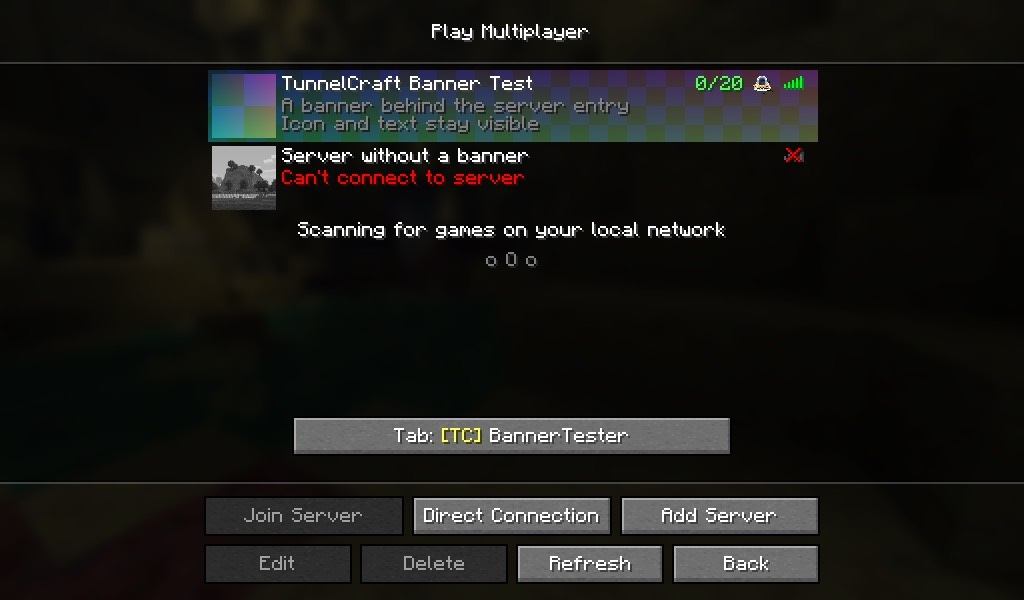
See it in Minecraft.
The actual server list with a banner and a server without one. Your banner is drawn behind the entry, while the server icon, name and description stay visible.
Give your server its background.
- Create your bannerUse the generator or make your own PNG. We recommend 1024 × 128 pixels, an 8:1 aspect ratio.
- Check the limitsTunnelCraft accepts PNGs up to 2048 pixels wide, 512 pixels high and 256 KiB (262,144 bytes). Other aspect ratios are cropped to the center.
- Put it in the server folderSave the file as
banner.pngnext toserver-icon.png. TunnelCraft darkens it behind your server entry to keep the text readable.
your-server/
├── server-icon.png
└── banner.png